This section introduces the Real-Time Clock (RTC) APIs including terms and acronyms, supported features, software architecture, details on how to use this driver, enums, structures and functions.
More...
This section introduces the Real-Time Clock (RTC) APIs including terms and acronyms, supported features, software architecture, details on how to use this driver, enums, structures and functions.
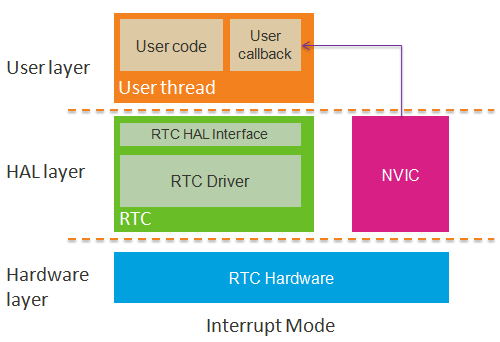
The software architecture of the RTC driver is shown in the diagram below.
Terms and acronyms
| Terms | Details |
| RTC | Real-Time Clock. A real-time clock (RTC) is a computer clock, mostly in the form of an integrated circuit, that keeps track of the current time. For more information, please refer to an introduction to the RTC in Wikipedia . |
Supported features
- Support date and time information.
Call hal_rtc_set_time() to set the RTC current time and hal_rtc_get_time() to retrieve the RTC current time. Call hal_rtc_set_time_callback() to register a callback to receive RTC current time change notification. This notification will be triggered in precise RTC time unit configured(like every second, every minute, or every hour etc.). Call hal_rtc_set_time_notification_period() to set the desired notification period. Then your callback function will be periodically executed according to the period you set.
- Support fine tuning of the RTC timer.
Call hal_rtc_set_repeat_calibration() to adjust the RTC time counting speed, if you have a highly accurate reference clock, or if you find out the RTC time is faster or slower. hal_rtc_set_one_shot_calibration() can be used to fine tune the current RTC time.
- Support alarm notification.
Call hal_rtc_set_alarm() to set the RTC alarm time and hal_rtc_get_alarm() to get the RTC alarm time. To receive alarm notification, please call hal_rtc_set_alarm_callback() to register a callback function and call hal_rtc_enable_alarm() to enable the RTC alarm notification. When the RTC current time reaches the RTC alarm time, the callback function you registered will be executed. The alarm notification can be disabled by using hal_rtc_disable_alarm() function, if it's no longer required.
- Support store data during power off.
There are several spare registers in the RTC to store data that are not cleared during a power off, except when the battery is removed.
Software architecture of RTC
- The user needs to call hal_rtc_init() to initialize the RTC hardware before using the RTC service. The user can set and get the current time or RTC alarm time at any time. RTC supports two notifications, the RTC current time change notification and the alarm notification. The user can use hal_rtc_set_time_callback() and hal_rtc_set_alarm_callback() respectively, to register callbacks for these two RTC notifications.
How to use this driver
- Set the RTC current time.
- Step 1. Call hal_rtc_init() to initialize the RTC hardware, if it hasn't been called after the power went on.
- Step 2. Call hal_rtc_set_time() to set the RTC current time.
- sample code: Note: the base year of RTC should be 2000, there will be leap year problem if a value other than 2000 is used.
#define BASE_YEAR 2000
set_current_time(uint16_t year, uint8_t mon, uint8_t day, uint8_t hour, uint8_t min, uint8_t sec) {
}
}
}
- Get the RTC current time.
- Step 1. Call hal_rtc_init() to initialize the RTC hardware if it has not been called after the power went on.
- Step 2. Call hal_rtc_get_time() to get RTC current time.
- sample code:
#define BASE_YEAR 2000
get_current_time(uint8_t *year, uint8_t *mon, uint8_t *day, uint8_t *hour, uint8_t *min, uint8_t *sec) {
}
}
}
- Register a user callback function to handle the RTC current time change.
- Step 1. Call hal_rtc_init() to initialize the RTC hardware if it has not been called after the power went on.
- Step 2. Call hal_rtc_set_time_callback() to register a user callback function to handle the RTC current time change, then when a specific RTC current time change occurs, the callback function is executed in an interrupt service routine.
- Step 3. Call hal_rtc_set_time_notification_period() to set a specific RTC current time change notification period.
- sample code:
uint32_t g_user_data;
}
}
}
}
void time_change_cb(void *user_data)
{
}
- Set the RTC alarm time.
- Step 1. Call hal_rtc_init() to initialize the RTC hardware if it has not been called after the power went on.
- Step 2. Call hal_rtc_set_time() to set the RTC alarm time.
- sample code:
#define BASE_YEAR 2000
set_alarm_time(uint16_t year, uint8_t mon, uint8_t day, uint8_t hour, uint8_t min, uint8_t sec) {
}
}
}
- Get the RTC alarm time.
- Step 1. Call hal_rtc_init() to initialize the RTC hardware if it has not been called after the power went on.
- Step 2. Call hal_rtc_get_alarm() to get the RTC alarm time.
- sample code:
get_alarm_time(uint8_t *year, uint8_t *mon, uint8_t *day, uint8_t *hour, uint8_t *min, uint8_t *sec) {
}
}
}
- Register a user callback function to handle the RTC alarm.
- Step 1. Call hal_rtc_init() to initialize the RTC hardware if it has not been called after the power went on.
- Step 2. Call hal_rtc_set_alarm_callback() to register a user callback function to handle the RTC alarm.
- Step 3. Call hal_rtc_enable_alarm() to enable an alarm notification. A callback function is triggered in an interrupt service routine if an alarm notification is received.
- sample code:
uint32_t g_user_data;
}
}
}
}
void alarm_handle_cb(void *user_data)
{
}
|
| hal_rtc_status_t | hal_rtc_init (void) |
| | This function initializes the RTC module. More...
|
| |
| hal_rtc_status_t | hal_rtc_deinit (void) |
| | This function deinitializes the RTC module. More...
|
| |
| hal_rtc_status_t | hal_rtc_set_time (const hal_rtc_time_t *time) |
| | This function sets the RTC current time. More...
|
| |
| hal_rtc_status_t | hal_rtc_get_time (hal_rtc_time_t *time) |
| | This function gets the RTC current time. More...
|
| |
| hal_rtc_status_t | hal_rtc_set_time_notification_period (hal_rtc_time_notification_period_t period) |
| | This function sets the RTC current time change notification period. More...
|
| |
| hal_rtc_status_t | hal_rtc_set_alarm (const hal_rtc_time_t *time) |
| | This function sets the RTC alarm time. More...
|
| |
| hal_rtc_status_t | hal_rtc_get_alarm (hal_rtc_time_t *time) |
| | This function gets the RTC alarm time. More...
|
| |
| hal_rtc_status_t | hal_rtc_enable_alarm (void) |
| | This function enables an alarm. More...
|
| |
| hal_rtc_status_t | hal_rtc_disable_alarm (void) |
| | This function disables an alarm. More...
|
| |
| hal_rtc_status_t | hal_rtc_set_time_callback (hal_rtc_time_callback_t callback_function, void *user_data) |
| | This function sets the RTC time notification callback, and the callback execution period is set by hal_rtc_set_time_notification_period(). More...
|
| |
| hal_rtc_status_t | hal_rtc_set_alarm_callback (const hal_rtc_alarm_callback_t callback_function, void *user_data) |
| | This function sets the alarm callback. More...
|
| |
| hal_rtc_status_t | hal_rtc_set_one_shot_calibration (int16_t ticks) |
| | This function sets the tick value that will be adjusted to the RTC current time. More...
|
| |
| hal_rtc_status_t | hal_rtc_get_one_shot_calibration (int16_t *ticks) |
| | This function gets the tick value that will be adjusted to the RTC current time. More...
|
| |
| hal_rtc_status_t | hal_rtc_set_repeat_calibration (int16_t ticks_per_8_seconds) |
| | This function sets the ticks that are periodically adjusted to the RTC current time per 8 seconds. More...
|
| |
| hal_rtc_status_t | hal_rtc_get_repeat_calibration (int16_t *ticks_per_8_seconds) |
| | This function gets the ticks that are periodically adjusted to the RTC current time per 8 seconds. More...
|
| |
| hal_rtc_status_t | hal_rtc_set_data (uint16_t offset, const char *buf, uint16_t len) |
| | This function stores data to the RTC registers that won't be cleared even if the system power is off, except when the battery is removed. More...
|
| |
| hal_rtc_status_t | hal_rtc_get_data (uint16_t offset, char *buf, uint16_t len) |
| | This function reads data from the RTC registers that won't be cleared even if the system power is off, except when the battery is removed. More...
|
| |
| hal_rtc_status_t | hal_rtc_clear_data (uint16_t offset, uint16_t len) |
| | This function stores zero to the RTC registers that won't be cleared even if the system power is off, except when the battery is removed. More...
|
| |
| hal_rtc_status_t | hal_rtc_get_f32k_frequency (uint32_t *frequency) |
| | This function gets the frequency value of 32.768kHz clock source, unit is in Hz. More...
|
| |
This function stores zero to the RTC registers that won't be cleared even if the system power is off, except when the battery is removed.
Note, the size of the backup date is HAL_RTC_BACKUP_BYTE_NUM_MAX bytes.
- Parameters
-
| [in] | offset | is the position of RTC spare registers to store data. The unit is in bytes. |
| [in] | len | is the datalength read from the RTC spare registers. The unit is in bytes. |
- Returns
- HAL_RTC_STATUS_ERROR means the RTC hardware isn't ready for use. HAL_RTC_STATUS_OK, the operation completed successfully.
- See also
- hal_rtc_set_data(), hal_rtc_get_data().
- Example
1 // Set the RTC spare registers (bytes 2 to 4) with zeros.
2 if(HAL_RTC_STATUS_OK != hal_rtc_clear_data(2, 3)) {
This function deinitializes the RTC module.
- Returns
- HAL_RTC_STATUS_OK, the operation completed successfully.
This function disables an alarm.
Call this function if the alarm notification is no longer required.
- Returns
- HAL_RTC_STATUS_OK, the operation completed successfully.
This function enables an alarm.
- Returns
- HAL_RTC_STATUS_OK, the operation completed successfully.
- Example
- Please refer to "Register a user callback function for handling alarm" in How to use this driver.
This function gets the RTC alarm time.
- Parameters
-
| [out] | time | is a pointer to the hal_rtc_time_t structure to store the date and time settings received from the RTC alarm time. |
- Returns
- HAL_RTC_STATUS_OK, the operation completed successfully.
- Example
- Please refer to "Get RTC alarm time" in How to use this driver.
This function reads data from the RTC registers that won't be cleared even if the system power is off, except when the battery is removed.
Note, the size of the backup data is HAL_RTC_BACKUP_BYTE_NUM_MAX bytes.
- Parameters
-
| [in] | offset | is the position of RTC spare registers to store data. The unit is in bytes. |
| [in] | buf | is the address of buffer to store the data received from the RTC spare registers. |
| [in] | len | is the datalength read from the RTC spare registers. The unit is in bytes. |
- Returns
- HAL_RTC_STATUS_ERROR means the RTC hardware isn't ready for use. HAL_RTC_STATUS_OK, the operation completed successfully.
- See also
- hal_rtc_set_data(), hal_rtc_clear_data().
- Example
1 // Read 3 bytes from the RTC spare registers byte 2~4 and store the 3 bytes data to buf
2 if(HAL_RTC_STATUS_OK != hal_rtc_get_data(2, buf, 3)) {
This function gets the frequency value of 32.768kHz clock source, unit is in Hz.
- Parameters
-
| [in] | frequency | is a pointer to store the frequency. |
- Returns
- HAL_RTC_STATUS_OK, the operation completed successfully.
This function gets the tick value that will be adjusted to the RTC current time.
Note, ticks will be equal to zero after executing this function if one shot calibration is finished.
- Parameters
-
| [in] | ticks | is the ticks that are adjusted to the RTC current time. The valid value is in a range from -2048(-62.5ms) to 2045(62.4ms). The unit is about 30.52us (1s/32768). |
- Returns
- HAL_RTC_STATUS_OK, the operation completed successfully.
- See also
- hal_rtc_set_one_shot_calibration()
| hal_rtc_status_t hal_rtc_get_repeat_calibration |
( |
int16_t * |
ticks_per_8_seconds | ) |
|
This function gets the ticks that are periodically adjusted to the RTC current time per 8 seconds.
- Parameters
-
| [in] | ticks_per_8_seconds | is the ticks that are adjusted to the RTC current time per 8 seconds. The valid value is in a range from -8192(-31.25ms) to 8191(31.246ms). The unit is about 3.81us (1s/32768/8). |
- Returns
- HAL_RTC_STATUS_OK, the operation completed successfully.
- See also
- hal_rtc_set_repeat_calibration().
This function gets the RTC current time.
- Parameters
-
| [out] | time | is a pointer to the hal_rtc_time_t structure to store the date and time settings received from the RTC current time. |
- Returns
- HAL_RTC_STATUS_OK, the operation completed successfully.
- Example
- Please refer to "Get RTC current time" in How to use this driver.
This function initializes the RTC module.
This function must be called once the power is on and before using the RTC service.
- Returns
- HAL_RTC_STATUS_OK, the operation completed successfully.
| hal_rtc_status_t hal_rtc_set_data |
( |
uint16_t |
offset, |
|
|
const char * |
buf, |
|
|
uint16_t |
len |
|
) |
| |
This function stores data to the RTC registers that won't be cleared even if the system power is off, except when the battery is removed.
Note, the size of the backup date is HAL_RTC_BACKUP_BYTE_NUM_MAX bytes.
- Parameters
-
| [in] | offset | is the position of RTC spare registers to store data. The unit is in bytes. |
| [in] | buf | is the address of buffer to store the data write to the RTC spare registers. |
| [in] | len | is the datalength stored in the RTC spare registers. The unit is in bytes. |
- Returns
- HAL_RTC_STATUS_ERROR means the RTC hardware isn't ready for use. HAL_RTC_STATUS_OK, the operation completed successfully.
- See also
- hal_rtc_get_data(), hal_rtc_clear_data().
- Example
1 // Write 3 bytes from buf to RTC spare registers, bytes 2 to 4.
2 if(HAL_RTC_STATUS_OK != hal_rtc_set_data(2, buf, 3)) {
This function sets the tick value that will be adjusted to the RTC current time.
Note, this function should be executed only once per second.
- Parameters
-
| [in] | ticks | is the ticks that are adjusted to the RTC current time. The valid value is in a range from -2048(-62.5ms) to 2045(62.4ms). The unit is about 30.52us (1s/32768). |
- Returns
- HAL_RTC_STATUS_OK, the operation completed successfully.
- See also
- hal_rtc_get_one_shot_calibration()
This function sets the ticks that are periodically adjusted to the RTC current time per 8 seconds.
- Parameters
-
| [in] | ticks_per_8_seconds | is the ticks that are adjusted to the RTC current time per 8 seconds. The valid value is in a range from -8192(-31.25ms) to 8191(31.246ms). The unit is about 3.81us (1s/32768/8). |
- Returns
- HAL_RTC_STATUS_OK, the operation completed successfully.
- See also
- hal_rtc_get_repeat_calibration()
This function sets the RTC current time change notification period.
The time notification callback function is different from a common timer or alarm callback function. The common timer or alarm callback function is only called once at a specific time, but the time notification callback function is called anytime a specific time notification condition is met. For example, the callback function runs for each second, if HAL_RTC_TIME_NOTIFICATION_EVERY_SECOND is the parameter.
- Parameters
-
| [in] | period | is the expected time for the RTC current time change notification period. |
- Returns
- HAL_RTC_STATUS_INVALID_PARAM, an invalid period parameter is given. HAL_RTC_STATUS_OK, the operation completed successfully.
- See also
- hal_rtc_set_time_callback()
- Example
- Please refer to "Register a user callback function for handling RTC current time change" in How to use this driver.

 1.8.11
